Business expense reports: what they are, how to manage and automate them
How to manage business expense reports and stop doing them by hand: process, tax rules, common mistakes and how to automate them. The complete guide for finance teams.

— What do you do all day? — Expense reports. — My condolences.
If that made you smile, you work in finance admin. Or you used to. Or you know someone who made it out alive.
Expense reports are repetitive manual work in its purest form. Receipts to chase, amounts to double-check one by one, rules to enforce. And then everything to retype by hand into the accounting system, as if copy-paste were a destiny and not a choice.
Spoiler: it's not the fault of the people doing it. It's the fault of the process.
Meanwhile, the role of whoever runs finance has changed right before our eyes: today they have to decide, read the numbers, manage risk. The data backs it up: according to the Economist Impact study for SAP (480 CFOs surveyed), 9 CFOs out of 10 are more involved in transformation and risk management than three years ago. And yet half their days still go to operational work.
In this guide we explain how managing business expense reports actually works, step by step. It's long, but it's built to be used: jump straight to the section you need, or read it all.
What expense reports are
An expense report is the document a team member uses to account for a work-related expense: date, amount, category, reason, attached supporting document. Three concepts come out of this, and they often get confused.
Expense report, reimbursement and corporate card: the differences
- Expense report: the statement itself. The document to fill in, check and approve.
- Reimbursement: the amount the company pays back to the employee when they covered an expense out of their own pocket.
- Corporate card expense: the expense paid directly with the company card. No out-of-pocket money, but it still has to be justified with a receipt and booked.
The practical difference is just one. With an advance, the employee puts up the money and waits for the reimbursement. With the corporate card the money is already gone, and what's left is justifying it and making it add up.
In both cases the key point is one: the valid supporting document. Without it, the expense doesn't stand. It's the first concept to lock in, because half of the control work hinges on it.
Which expenses end up in an expense report
Most of the work concentrates on a few recurring categories. Knowing them helps you see where the problems start.
- Travel and trips. Trains, flights, hotels, taxis, parking, rentals, tolls. The most frequent expenses for people working off-site, and the ones with the most documents to collect.
- Meals and entertainment. Business lunches, dinners with clients, breakfasts on the road. These are the expenses with the most rules, the most thresholds and the most grey areas. This is where most of the "was this in or out of policy?" debates start.
- Small operational purchases. Office supplies, a subscription paid on the fly, a one-off expense to close a project. Small individually, hard to track.
- Advances. Money put up by the person, to be paid back. The more days go by, the harder it gets to reconstruct what they were and why.
These are small expenses, taken one by one. But multiplied by people and by months, they become the line item that eats the most of admin's time. Fifty people with two trips a month make a hundred expense reports to handle every month.
Who handles expense reports in a company
Expense reports aren't one person's problem. They pass through three different hands, and each one loses something.
The person who spends
The salesperson, the engineer, the manager on the road, the employee. For them the expense report is a burden: receipts to keep, forms to fill in, advances to get back. The more complicated it is, the more they put it off. And the more they put it off, the later the data arrives.
The person who checks
Admin, the accounting lead, finance ops. This is who pays the steepest price: checking every line, chasing missing documents, fixing wrong categories, and then retyping everything into the accounting system.
The person who decides
The CFO. They don't look at the single report, but they carry the weight of the result: spending out of control, visibility late, the close slipping. And they know full well that the most strategic mind in the company is doing data entry.
The takeaway: a slow process doesn't slow down one person. It slows down three.
The expense report process, step by step
Every expense report, however you handle it, runs the same loop. Five stages. And each one has a trap.
Step 1: Capturing the document
You collect the receipt. It's the most fragile point of the whole process: the receipt gets lost, fades in a pocket, ends up in a chat or an email and is never found again. Anything not captured on the spot becomes a problem later.
Step 2: Filling in and submitting
You enter amount, date, category, reason, and send it for approval within the deadline. This is where transcription errors and wrong categories are born, especially when everything is filled in at the end of the month, in a rush.
Step 3: Review and approval
Someone checks that the expense is legitimate, in policy and well documented. This is the stage where admin loses whole days, because checking properly means looking line by line: amount, document, threshold, category.
Step 4: Reimbursement or reconciliation
If it was an advance, the reimbursement goes out. If it was on the corporate card, the transaction has to be matched to the right document. Get the match wrong here and you'll have numbers that don't add up at the close.
Step 5: Booking and archiving
The expense goes into the accounting system, with the correct accounting category, and is stored to standard for the tax authorities. Every step done by hand is another chance to make a mistake.
What manual expense reports really cost
Ask how much expense reports cost and the answer is almost always: "Nothing, admin handles them." There it is. That's exactly the problem.
The cost isn't an invoice. It's time. It's the person who spends days checking instead of closing the books. It's the CFO who sees the spending numbers three weeks late. It's the transcription error that surfaces at the close and pushes everything else back.
Then add the cost of errors: duplicate expenses paid twice, VAT lost because the invoice was missing, out-of-policy spending.
And there's a third cost, the hardest to measure and the most expensive of all: talented people doing work that doesn't need their brain. This is the real enemy. Expense reports, and with them all repetitive manual work, keep the most strategic mind in the company away from decisions.
Tax rules in Italy: VAT, deductibility and a valid document
In Italy the tax rules are strict and specific:
A valid document
Just any photo won't do. To deduct costs and reclaim VAT you need a proper tax document: an invoice in the company's name or a suitable receipt. A generic till receipt isn't always enough for all tax and accounting purposes, and an invalid document is trouble you discover too late, when it's already in the books.
VAT deductibility
In many cases you need a suitable tax document, often the invoice, especially to reclaim VAT. That's why the invoice should be asked for on the spot, at the restaurant or the hotel, not reconstructed a month later when nobody bothers anymore.
Deductibility
Entertainment expenses and meals have specific deductibility limits, different by category. They need to be classified correctly from the start: a wrong category at entry is one more adjustment at the close.
Payment traceability
Italian regulation keeps moving toward traceability: reimbursements for certain travel expenses, to stay deductible, must be paid with traceable methods and not in cash. Here the corporate card is an advantage, because every expense is traced automatically.
Archiving
Documents must be stored to standard and findable. An invoice lost in an email is not an archived document.
Note: percentages, thresholds and exact rules change with Italy's annual Budget Law. You'll find the updates on the blog. This guide stays on the process, which never changes.
The most common problems in finance teams
Manual process, always the same problems. You know them by heart.
Manual checking
Every month admin spends entire days verifying reports one by one. Not because they're slow, but because accurate checking, done by hand, takes time by nature.
Chasing documents
A huge slice of time goes to chasing whoever didn't attach the receipt.
Zero visibility
You only know what was spent at the end of the month, when it's already too late to step in.
Transcription errors
Every copy-paste into the accounting system is a chance to get an amount, a date or a category wrong. And an error caught at the close costs ten times one caught right away.
The approval bottleneck
Reports stuck waiting for someone to approve them. If approval goes through email, one person being away is enough to block everything.
The edge cases that break the process
The problems above are routine. Edge cases are the limit cases, the ones a process that "works on paper" can't handle. They're also what separates real checking from a rubber stamp.
The most frequent edge cases
- Invalid document. Instead of the tax receipt you get a sticker, a flyer, a random photo. It has to be caught, otherwise an expense with no valid document ends up in the books.
- Over-threshold expense. A 34 euro lunch, limit at 25. Out of policy, to be caught before approval. Not after it's already been reimbursed.
- Missing receipt. The transaction is there, the document isn't.
- Mismatched amounts. The declared amount doesn't match the one on the receipt. By hand you tend to approve at a glance, and that's exactly how mistakes happen.
- Multiple uploads. Several receipts uploaded all at once, to be split into separate expense reports without losing any.
- Community or shared cards. When the card belongs to a team, figuring out who spent what gets complicated and accountability gets diluted.
- Foreign-currency expenses. Exchange rate of the day, fees, an amount that doesn't match the receipt. Another point where the numbers risk not adding up.
The case of duplicates
It deserves its own paragraph, because it's the sneakiest of all. A duplicate is the same expense reported twice. It happens in three ways:
- the same receipt uploaded twice, once on paper and once digitally;
- the same expense entered by two different people who were at the same lunch;
- the same trip split across two months, so the overlap doesn't catch the eye.
Sometimes it's an honest mistake. Sometimes it isn't. Either way the damage is double: you pay twice and you get the numbers wrong. By hand, you only catch a duplicate if you cross-check dates, amounts and vendor across hundreds of lines.
These edge cases aren't the rare exception. They're the reason manual checking never ends.
How to build an effective expense policy
A policy that works puts four things in writing.
- What can be spent. Allowed categories and the ones that aren't. What counts as meals, what as travel, what isn't reimbursable at all.
- How much can be spent. Thresholds by type of expense and, if needed, by role.
- By when. The deadline for submitting reports.
- With which document. What to attach: receipt, invoice in the company name, reason. Above all where the invoice is needed so you don't lose the VAT.
Two golden rules. First: write it in plain language. Second, the most important: the best policy is the one built into the operational flow.
How to measure expense management
What you don't measure, you don't improve. Expense reports are no exception, yet almost no one measures them. Four numbers are enough to tell whether your process is healthy or sick.
- Average handling time. How many minutes from when the expense is made to when it's approved and recorded. If the answer is "weeks", the process is broken.
- Compliance rate. How many reports meet the policy on the first submission, with no corrections. If half come back, the problem isn't the people: it's the policy or the tool.
- Spending by category. Where the money actually goes. Travel, meals, subscriptions.
- Cost of checking. How many hours a month admin spends checking and recording.
Measure these four and you'll have something you never have at the end of the month: control over the spending that's about to arrive.
Manual vs automated management
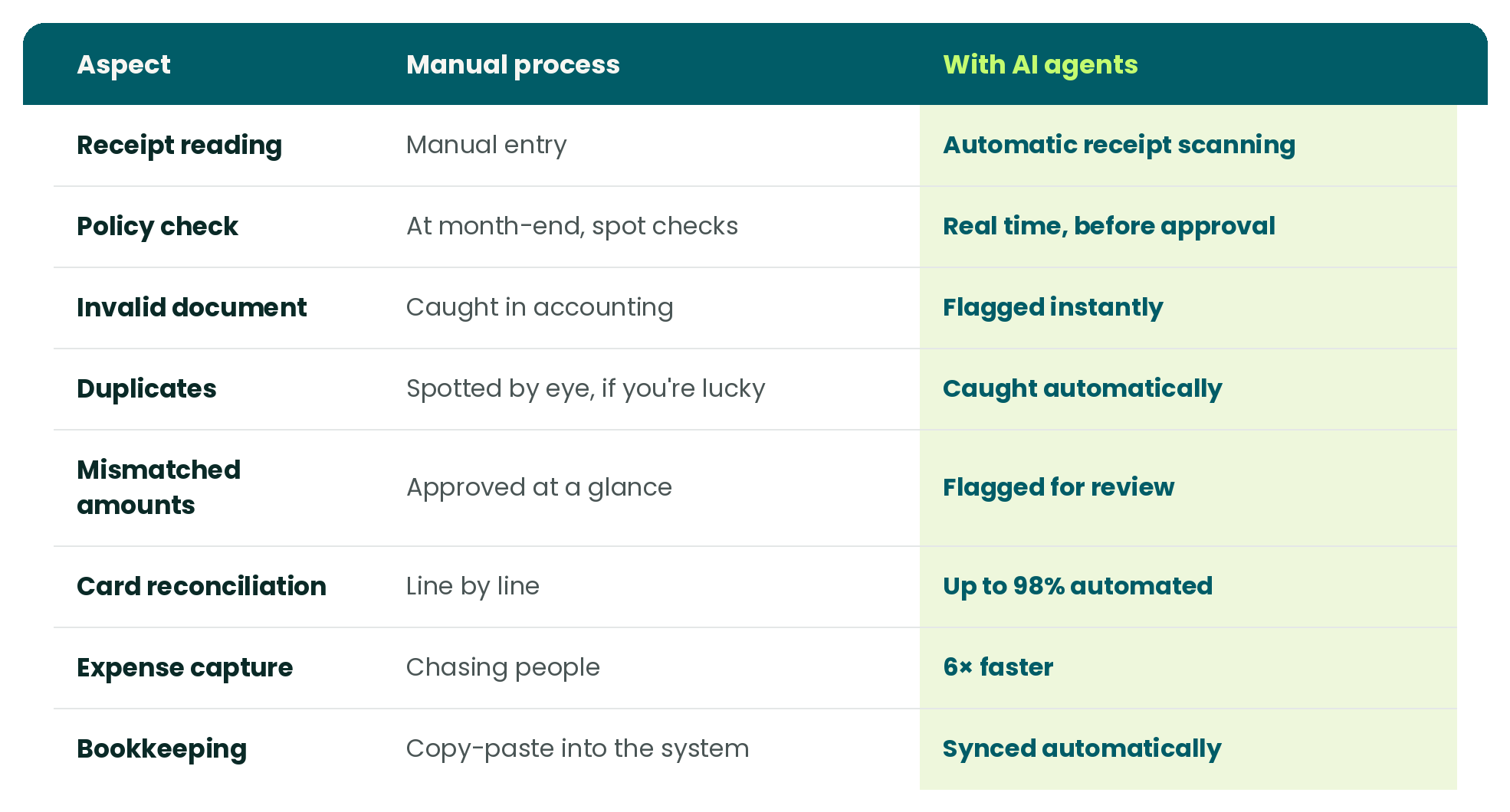
According to the GBTA, creating and submitting an expense report by hand takes 20 minutes on average. Automation can cut that time by up to 90%. Seen that way, it's almost striking.
The benefits of doing it well
Good expense management isn't there "for admin". It serves three people, in three different ways.
For the person who checks
Less time lost verifying line by line and chasing documents. Up to 30% of time given back, expense capture 6× faster, a faster close because the data arrives already clean in the accounting system.
For the person who spends
Faster reimbursements, no forms, no shared spreadsheets. A photo of the receipt from your phone and you're done. The rules are clear before you spend, not after.
For the person who decides
Visibility on spending in real time, not at month-end. Policies followed 100% without lifting a finger, and reliable numbers to base decisions on.
Best practices to cut errors and time
- Write a clear policy.
- Put the rules inside the process, not in a PDF nobody opens.
- Capture documents on the spot.
- Check by exception, not line by line.
- Close the loop with the accounting system.
- Give a card to whoever spends often.
How to choose expense management software
If you decide to automate, the right question isn't "which one costs less". It's which one actually takes the manual work off your hands.
Here's what software that truly works needs to do:
- Reads the receipt on its own. Amount, date and category pulled from the photo, no typing.
- Checks policy in real time. Flags the over-threshold before approval, not after.
- Recognizes the edge cases. Invalid documents, mismatched amounts, duplicates. It catches them automatically.
- Reconciles the cards. Matches expense and document without you cross-checking lines by hand.
- Connects to your accounting system. The expense goes into the books with no copy-paste.
- Is secure and compliant. GDPR and PSD2 compliant, data safe.
- Works on mobile. Because the receipt gets uploaded on the spot, from the phone.
The question to ask yourself isn't "how many features does it have". It's: "how much manual work does it really take off me, and how many edge cases does it handle for me?".
From expense reports to corporate cards
Almost all expense report problems start upstream: from the fact that the person pays out of pocket and then reports it. The control comes afterward, when the money has already left someone's wallet.
With corporate cards the loop gets shorter. The expense is already traced, amount and date arrive automatically, and all the person has to do is attach the document. No advances, no reimbursements to chase, no shared spreadsheet nobody updates.
How WithLess takes the manual work out of expense reports
Let's be clear: we hate expense reports.
We hate receipts to chase. We hate lines to re-check one by one. We hate copy-paste into the accounting system. And you, probably (actually, definitely), do too.
Did you study finance to do data entry? No. That's why we gave it to artificial intelligence.
WithLess is the AI finance coworker that takes the work you hate and does it for you. It reads, checks, reconciles, records. What's left for you is the time and the clarity for the only thing that really matters: deciding.
It reads and matches receipts for you
An expense comes in? WithLess reads the receipt, pulls amount, date and merchant and sets the right category. Zero typing. And if someone uploads a sticker instead of the receipt, or the same receipt twice, it blocks it. Instantly.
It blocks out-of-policy spending before it happens
You set the limits by category, merchant, amount or period. You don't discover the over-threshold expense at month-end: it just doesn't happen. 100% of policies followed.
It sends approvals to the right person
Every report to the right reviewer, automatically. You approve from your phone, with receipt and context already there. Approvals go from days to minutes.
It reconciles and writes into the accounting system
Expenses matched to transactions, into the accounting system, with no copy-paste. Up to 98% automated. The close stops being a nightmare.
The result: up to 30% of time given back, expense capture 6× faster, over 500k unlocked for our clients. Fully compliant, GDPR and PSD2.
Now imagine: finance, without the repetitive manual work.
FAQ
What's the difference between an expense report and a reimbursement? The expense report is the document you use to account for a work expense. The reimbursement is the moment you get back the money you advanced. One leads to the other, but they're not the same thing.
Are expense reports tax deductible? It depends on the type of expense and the document. Meals and entertainment follow specific limits, and to reclaim VAT you often need the invoice in the company's name, not just the receipt.
Is a receipt enough, or do I need an invoice? To record the expense, a receipt can be enough. To reclaim VAT, on meals and many trips, you need the invoice. That's why it's worth asking for it on the spot, not a month later.
Can expense reports be automated? Yes. Receipt reading, policy checks, duplicate handling and card reconciliation are all done by artificial intelligence today. What's left for admin is deciding on the cases that need judgment.
How do you avoid duplicates? By hand it's nearly impossible across hundreds of lines. A system that cross-checks date, amount and vendor automatically catches the same receipt uploaded twice before it becomes a double payment.
How much time do you get back by automating expense reports? Up to 30% of admin's time and expense capture 6× faster. Time that goes back to decisions instead of data entry.
Do you need to give a corporate card to everyone? No. It's worth giving it to whoever spends often, so you remove advances and reimbursements. For occasional expenses the traditional expense report stays. The two coexist.
Where should you start to improve the process? From the most painful point. For most companies that's document capture and manual checking. Fix those, and the rest of the process can breathe.
The smartest way to manage business spend.
WithLess uses AI to control spend in real time, automate finance ops, and eliminate manual work.
Let's talk